Automatic Energy refill on TRON: how it works and who actually needs it

Auto-refill keeps Energy on an address: whenever it drops below a threshold you set, a new portion is delegated and paid from your balance. It is built for hot wallets of services that send USDT at any hour: DEX and payment services, withdrawal wallets and unpredictable payouts. If you send a few transfers a month, or pay out in a batch on a schedule, one-time Energy bought right before is cheaper: about 1.24 TRX per transfer against roughly 24.96 TRX a day for an address kept topped up.

What automatic refill is

You give the service an address and a rule: “when this address has less than 65,000 Energy, add 131,000.” The service watches the address and, when the rule fires, delegates the Energy and takes the price from your balance with us. It is a standing order, not a one-off purchase: it keeps running until you stop it.

How it works, and what the service can see

Your own TRON address, how much Energy to add each time, and the threshold below which to add it. No private key or seed phrase is involved.
Energy on the addressThe mark is the threshold of the rule.
Delegation needs no private key and no seed phrase: the address stays in your hands, and the service can neither move your USDT nor sign anything for you. More in Is renting TRON Energy safe?

Auto-refill against one-time Energy

One-time EnergyAuto-refill
When you payOnce, before a transferEvery time the rule fires, each hour that the address is below the threshold
Watching the balanceYou check before sendingThe service does
When nothing is sentNothing is chargedDeliveries keep being charged until you stop the rule
FitsA few transfers a month, or a scheduled batchA hot wallet that sends at any hour

When auto-refill pays off and when it is an overpayment

How many USDT transfers a month do you send?

5 a month
One-time Energy
6.2 TRX
Auto-refill, kept up all month
748.8 TRX
One-time Energy is cheaper here, by 742.6 TRX.One-time: 1.24 TRX per transfer, order fee included. Auto-refill: 24.96 TRX a day, 24 deliveries of the smallest portion, for 30 days. At today’s prices; they move with the market.
Each delivery lasts an hour. If the address sits below the threshold after it ends, the rule delivers again. So an address that is kept supplied all day is charged for up to 24 deliveries. At today’s price the smallest one, 65,000 Energy, is 1.04 TRX, which makes about 24.96 TRX a day.One-time Energy for a transfer is 1.24 TRX, so on these prices auto-refill starts to cost less per transfer only past roughly 21 transfers a day. The prices move, so redo the sum with the live ones.Who needs it: the hot wallet of a DEX or payment service, an exchange’s withdrawal address, any address that pays out at unpredictable times around the clock, where nobody can order Energy by hand before each transfer. Who does not: a private sender with a few transfers a month, and payouts on a schedule. For a daily batch, one order right before it is enough, and the address is not charged for the hours in between. Smart mode, which delivers back what each transfer used (3.21 TRX per 65,000 Energy), is for addresses that send one transfer at a time, and auto-renewal keeps a fixed amount on the address for a fixed daily price.

How much Energy one USDT transfer takes

A USDT TRC-20 transfer needs about 65,000 Energy if the recipient already holds USDT and about 131,000 if it never has. Without Energy the network burns 100 sun per unit, about 6.85 TRX for the first case (read on September 21, 2026; the network changes it by vote). Set the threshold of a rule no lower than the Energy one transfer needs, so a transfer never starts on an empty address. The exact figures for your case are in How much Energy does a USDT TRC-20 transfer need?

If the transfer has already failed

Look at your address on tronscan.org: the Energy figure in Resources is what it has right now.
Order Energy for the address you send from, not the recipient’s, in the amount this one transfer needs.
Send the USDT again once the Energy shows on the address.
Open the transaction on TronScan and check that the status is SUCCESS.
The TRX burned before the failure is not returned. Why it happens: FAILED – OUT OF ENERGY on TRON.

Typical setups

A DEX or swap hot wallet

Pays out swaps at any hour, often several close together. Add 650,000 when below 325,000: the threshold sits at half the portion, so a burst of about ten transfers never starts on an empty address.

Withdrawals of a payment service

Single withdrawals at unpredictable moments. Add 131,000 when below 65,000: about two transfers at once, and a new portion as soon as the Energy drops under what one transfer needs.

Not this: a payout batch once a day

The address would be charged for the hours in between. Order Energy once right before the batch instead.

Limits, and how much to keep on the balance

Each delivery is 65,000 to 5,000,000 Energy and lasts one hour; the threshold can be anything from 0 to 5,000,000. An address can have one auto-refill rule.The balance has to cover the next delivery of every running rule together: 2.1 TRX for the default one, or the dashboard refuses to start it. A rule can deliver up to 24 times a day, so for a hot wallet that nobody watches we suggest keeping a day of deliveries in reserve: about 50.3 TRX at this size. That is our advice, not a rule of the service. The low-balance alert below warns you before a rule pauses.

Start auto-refill

Set up auto-refill

Energy
Energy
Have an account? Sign in
Nothing is started yet and nothing is charged. After you sign in, the dashboard opens with these values filled in, and you confirm them there. No private key is needed, only the public address.

What happens next

Enter the address, how much Energy to add each time and the threshold.
Create an account or sign in. The values are kept for you.
Confirm in the dashboard and top up the balance. Only then does the rule start.

What it looks like in the dashboard

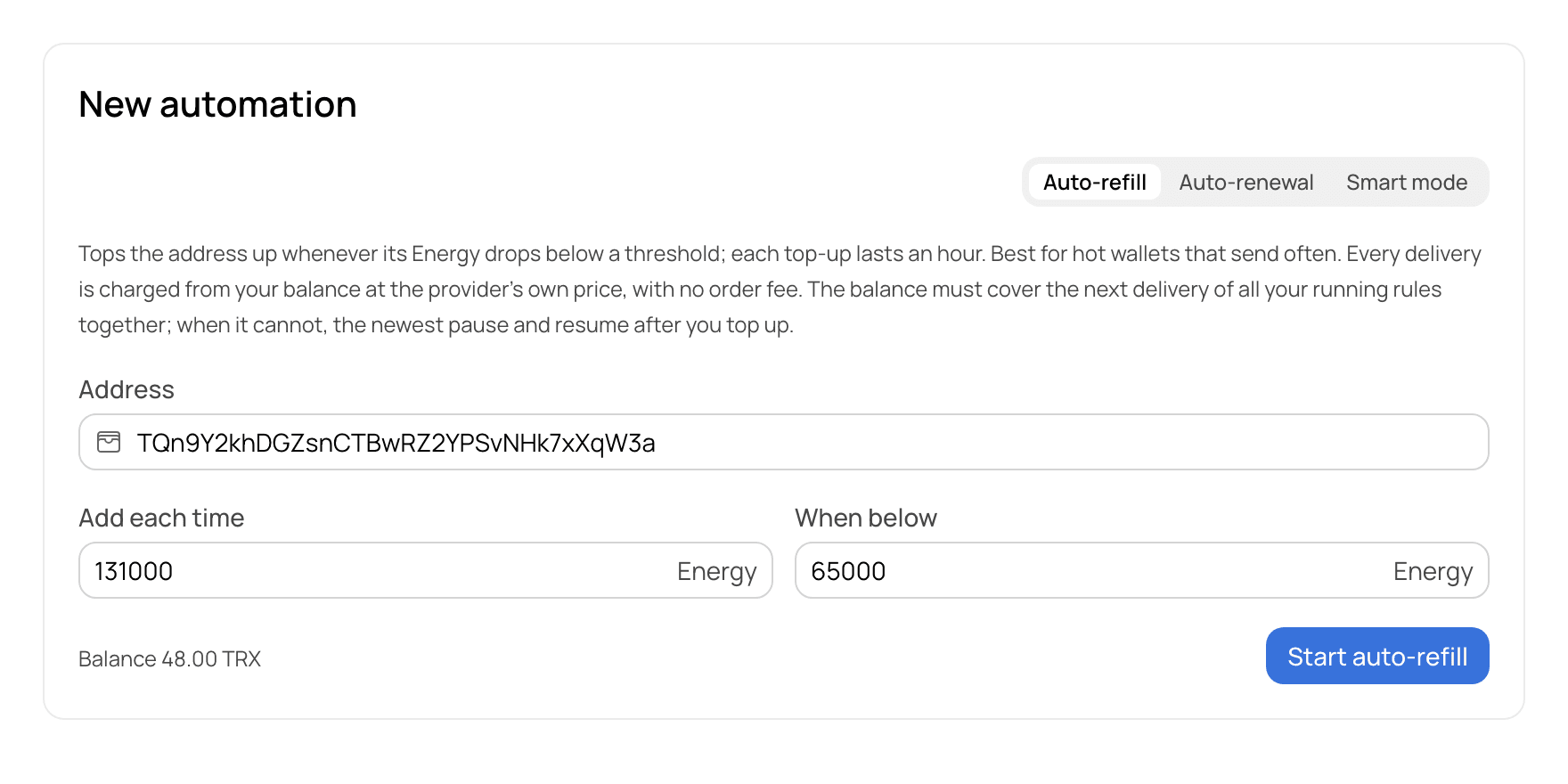
The New automation form in the GetGas dashboard with Auto-refill chosen, an address entered, 131,000 Energy to add and 65,000 as the threshold.
1. The form, filled in. Your values from this page arrive here.
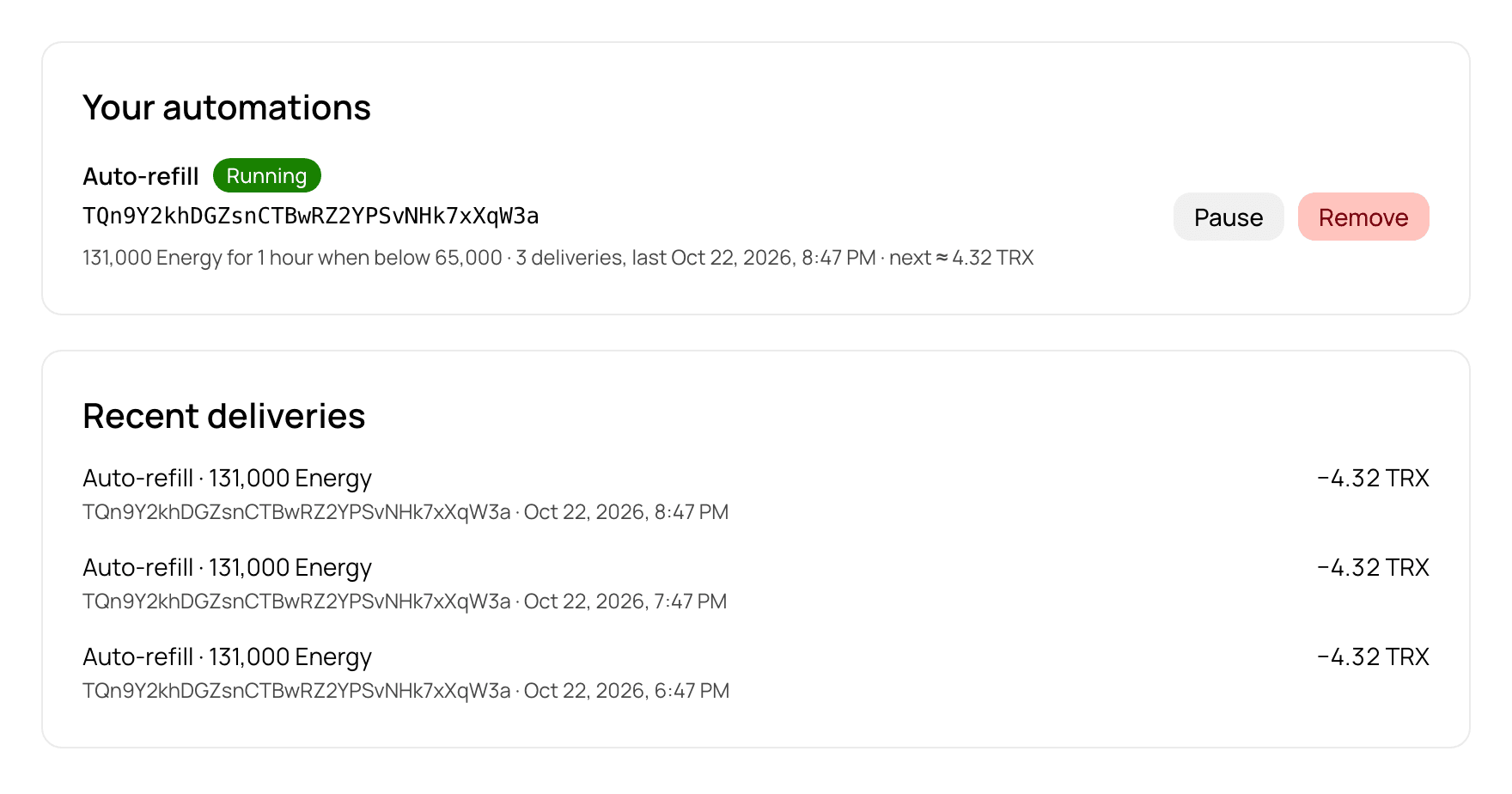
The Automations page of the dashboard: an Auto-refill rule marked Running, its next charge, and a list of recent deliveries with the amount charged for each.
2. The rule running: status, the next charge, every delivery with its amount.
The screenshots are the real dashboard with example data: the address and the amounts are illustrative. The dashboard is in English.

Setting up auto-refill with GetGas

Sign up and top up your balance. The balance has to cover the next delivery of all your running rules together.
In the dashboard open Buy Energy, “New automation”, and choose Auto-refill.
Enter the address, how much to add each time and the threshold (“When below”). The form suggests 131,000 and 65,000.
Start it. Pause or remove the rule under Automations whenever you want; if the balance runs out, the newest rules pause by themselves and resume after you top up.

How to check that the Energy arrived

Open your address on tronscan.org and look at Resources: the Energy figure should have gone up by the amount delivered, and the delegation appears on the account page. Every delivery is also listed in the Automations section of the dashboard with the amount charged. If that does not match, write to support at @getgas_helpbot

From code, and an alert before a rule pauses

A service can create, pause and remove these rules from code with an API key, and read every delivery in the same account. To hear about a low balance before a rule pauses, set a threshold under API & Keys → Webhook → Low balance alert in the dashboard. When a charge takes the balance below it, a signed balance.low event is sent to your webhook, and again every hour until you top up. It is a webhook, not an e-mail, so it needs a URL on your side.
FAQ

Questions about auto-refill

How do I choose the threshold?

Set it at least at what one transfer needs: 65,000 Energy, or 131,000 if your recipients are often new to USDT. A threshold below that lets a transfer start on an address that cannot finish it.

Is unused Energy lost?

Yes. Energy is delegated for a period, an hour for each auto-refill delivery, and when it ends it goes back whether or not you used it. You pay for the delivery, not for the transfers.

Can I turn auto-refill off, and is anything returned?

You can pause or remove the rule at any time in the dashboard under Automations. Deliveries already made are charged and are not refunded; nothing further is charged once it is stopped.

Do I still need TRX on the address?

For the Energy, no. A transfer also uses about 345 Bandwidth, and every address gets 600 free per day; past that a little TRX is burned. The guide on sending USDT with no TRX in the wallet covers it.

Is Energy enough, or is Bandwidth needed too?

Both are used by every transfer. Energy is the large part; Bandwidth is small and mostly covered by the free daily allowance (600, read on September 21, 2026).

What if the refill has not happened by the time I send?

Then the transfer runs without enough Energy and the network burns TRX for the rest, or fails if there is none. Auto-refill reacts to the balance; it does not know a transfer is coming. For a transfer you are about to make, order Energy first.

Does this work for a withdrawal from an exchange?

No. Energy has to be on the address that signs the transfer, and on an exchange that address is the exchange’s. Auto-refill and one-time Energy both work when you send from your own wallet.

Which one do you need?

Need Energy for one transfer right now, or sending every day?