Automatic Energy renewal on TRON: a fixed amount every day

Auto-renewal keeps a set amount of Energy on an address and renews it every day, paid from your balance. It is for addresses with steady traffic through the day, such as service wallets and payout addresses, that need a fixed daily cost and nobody to watch them. At today’s price 131,000 Energy is 10.48 TRX a day. For a few transfers a month, one-time Energy (1.24 TRX per transfer) is cheaper.

How it works

Your own TRON address and the amount of Energy to keep on it. No private key or seed phrase is involved.
Energy on the address
Delegation needs no private key and no seed phrase: the address stays in your hands, and the service can neither move your USDT nor sign anything for you. More in Is renting TRON Energy safe?

What it costs against auto-refill

How much Energy do you want on the address?

131,000 Energy
Auto-renewal
314.4 TRX
Auto-refill, kept up all month
1,509.12 TRX
Auto-renewal is cheaper here, by 1,194.72 TRX.Renewal is priced as a day-long lease: 80 sun per unit, 10.48 TRX a day for 131,000. Auto-refill keeps the same Energy by delivering it every hour, 50.3 TRX a day for 131,000, if the address is below its threshold after each portion expires. Prices at the moment the page was loaded; they follow the market.
One-time EnergyAuto-renewal
When you payOnce, before a transferEvery day, for the amount you keep
What you doOrder before sendingNothing after the setup
When nothing is sentNothing is chargedThe day is charged until you stop the rule
FitsA few transfers a monthSteady traffic through the day, a fixed budget

Who needs it

The wallet of a service that sends USDT through the whole day, a payout address with a predictable daily volume, anything where nobody can order Energy by hand and a fixed daily cost is easier to plan than hourly deliveries. It does not fit a private sender with a few transfers a month, nor payouts that are rare and large: for those, order once before the transfer. If transfers come in at any moment and one at a time, see smart mode; for an address that must never drop below a threshold, see auto-refill.

Typical setups

Payouts through the day with a known volume

Affiliate or payroll payouts that go out all day. The cost is one number to plan: 10.48 TRX a day for 131,000 Energy, whatever the number of transfers.

A service wallet nobody should have to watch

Size it for the most transfers you send close together: 65,000 Energy for each transfer to an address that already holds USDT, 131,000 for one that does not.

Not this: a few transfers a month

The day is charged whether or not anything is sent. Order Energy right before each transfer instead.

Limits, and how much to keep on the balance

A renewal keeps 65,000 to 1,000,000 Energy on the address, renewed every day. An address can have one auto-renewal rule.The balance has to cover the next delivery of every running rule together: one day, 10.48 TRX for 131,000 Energy, or the dashboard refuses to start it. To get through a weekend without a top-up we suggest keeping about a week in reserve: 73.36 TRX at this size. That is our advice, not a rule of the service. The low-balance alert below warns you before a rule pauses.

Start auto-renewal

Set up auto-renewal

Energy
Have an account? Sign in
Nothing is started yet and nothing is charged. After you sign in, the dashboard opens with these values filled in, and you confirm them there. No private key is needed, only the public address.

What happens next

Enter the address and how much Energy to keep on it.
Create an account or sign in. The values are kept for you.
Confirm in the dashboard and top up the balance. Only then does the rule start.

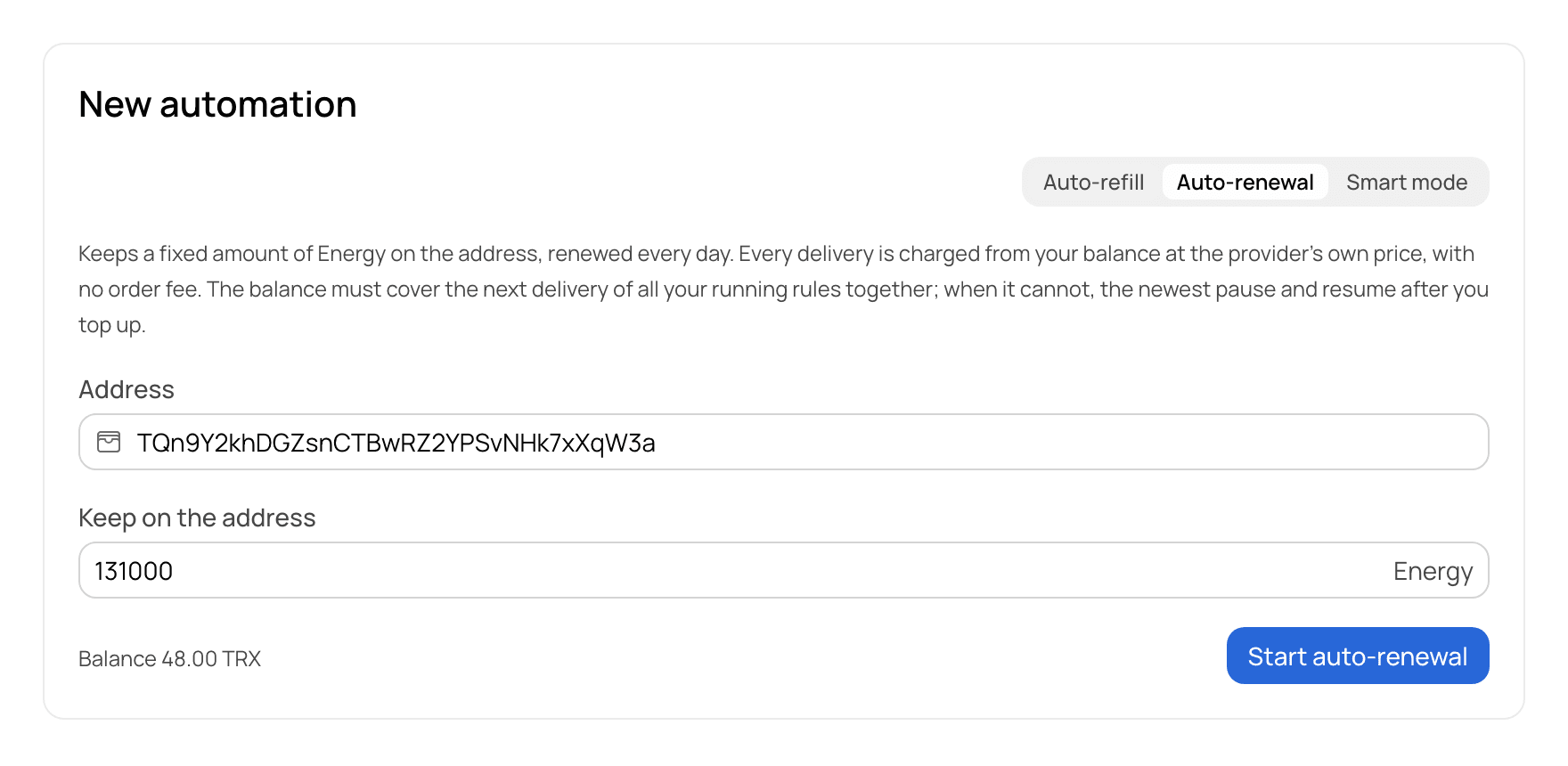
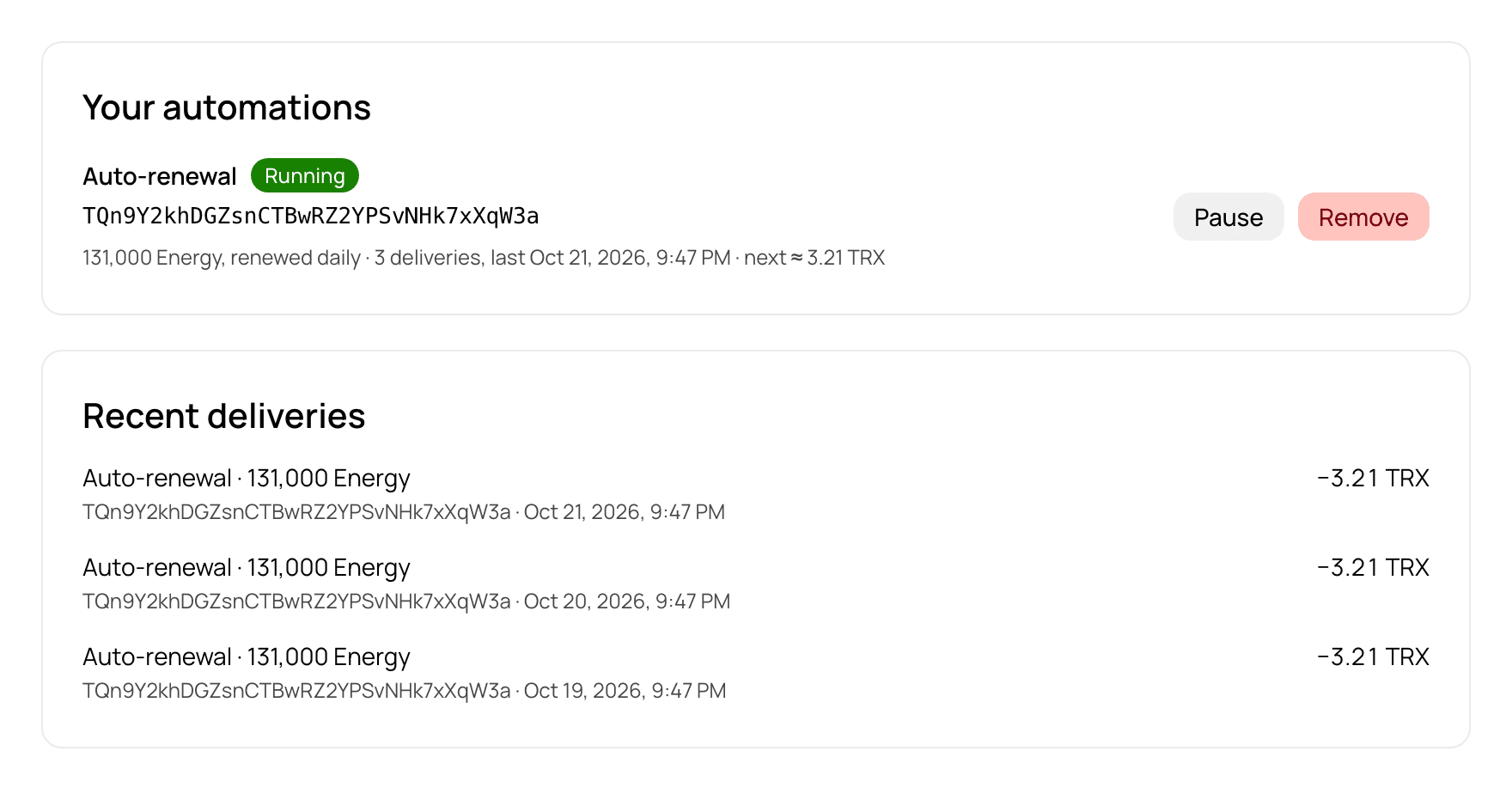
What it looks like in the dashboard

The New automation form in the GetGas dashboard with an Auto-renewal rule being set up: an address entered and 131,000 Energy to keep on it.
1. The form, filled in. Your values from this page arrive here.
The Automations page of the dashboard: an Auto-renewal rule marked Running, its next daily charge, and a list of recent daily deliveries with the amount charged for each.
2. The rule running: status, the next charge, every delivery with its amount.
The screenshots are the real dashboard with example data: the address and the amounts are illustrative. The dashboard is in English.

Setting up auto-renewal with GetGas

Sign up and top up your balance. It has to cover the next delivery of all your running rules together.
In the dashboard open Buy Energy, “New automation”, and choose Auto-renewal.
Enter the address and how much Energy to keep on it. The form suggests 131,000.
Start it. Pause or remove the rule under Automations whenever you want.

How to check that it works

Open your address on tronscan.org and look at Resources: the Energy figure should show the amount you chose. Every delivery is also listed under Automations in the dashboard with the amount charged. If transfers still fail, FAILED – OUT OF ENERGY on TRON explains why, and the amount to keep is worked out in How much Energy does a USDT TRC-20 transfer need? For anything else write to @getgas_helpbot

From code, and an alert before a rule pauses

A service can create, pause and remove these rules from code with an API key, and read every delivery in the same account. To hear about a low balance before a rule pauses, set a threshold under API & Keys → Webhook → Low balance alert in the dashboard. When a charge takes the balance below it, a signed balance.low event is sent to your webhook, and again every hour until you top up. It is a webhook, not an e-mail, so it needs a URL on your side.
FAQ

Questions about auto-renewal

Auto-renewal or auto-refill for a busy wallet?

Renewal is a fixed price per day for the amount you keep: 10.48 TRX for 131,000. Refill delivers every hour while the address is below its threshold and charges each delivery: up to 50.3 TRX a day for the same amount. Refill reacts to use, renewal does not.

Is unused Energy lost?

Yes. The Energy is leased for a day and goes back at the end of it whether or not you used it. You pay for the daily lease, not for the transfers.

Can I stop it, and is anything returned?

You can pause or remove the rule at any time in the dashboard under Automations. A day already delivered is charged and not refunded; nothing further is charged once the rule is stopped.

What if my balance runs out?

The balance has to cover the next delivery of all your running rules together. When it no longer does, the newest rules pause by themselves and resume after you top up.

How much Energy should I keep?

A transfer to an address that already holds USDT takes about 65,000, to one that does not about 131,000. Multiply by the transfers you send in a day and see the guide on how much Energy a transfer needs.

Do I still need TRX on the address?

For the Energy, no. A transfer also uses about 345 Bandwidth, and every address gets 600 free per day; past that a little TRX is burned. The guide on sending USDT with no TRX in the wallet covers it.

Does this work for a withdrawal from an exchange?

No. Energy has to be on the address that signs the transfer, and on an exchange that address is the exchange’s. It works for addresses you control.

Which one do you need?

Steady traffic every day, or Energy for one transfer?